To create a Custom Library DLL with Jscript .NET, proceed as follows:
- Declare a class inside a package. This class must extend the class CustomCode which is defined in Firmglobal.Confirmit.SurveyEngine.Common assembly.
- The functions you wish to expose through your Custom Code Library must be declared static.
- The standard Forsta Plus script functions can be accessed with the Survey prefix and using the dot notation. For example, the f(..) function can be accessed from the Custom Code Library with Survey.f(..). See Figure 1 below for an example of a Custom Code Library file. Note that the package name, class name and file name can be chosen arbitrarily.
- You must compile your assembly with an AssemblyInfo.js file. This file should have a fixed version number (for example 1.0.0.0). Do not use the star (*) notation as this will cause the assembly to be incompatible when upgrading Forsta Plus. A complete AssemblyInfo.js file is provided in Figure 4 below. The version information is located in the AssemblyVersion tag in this file.
- You must have your assembly signed with a key distributed by the Forsta Plus installation. This key is located at [
confirmprogram]\bin\ GeneratorCode.snk. Note the AssemblyKeyFile tag in Figure 4 below. - Use the line below to compile the code files (the [CONFIRMITPROG] needs to be substituted with the correct path the Confirmit program folder):
jsc /t:library
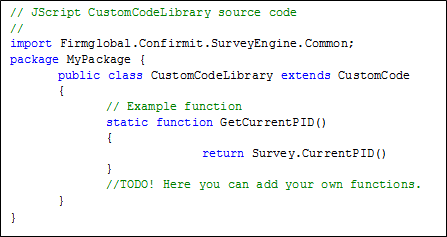
Figure 1 - The Jscript .NET syntax for the custom code class (CustomCodeLibrary.js)
If your custom code library needs access to a web service then we need to Assert that permission before the call to the web service, as shown in the figure below. Note that Asserting permissions is a required procedure.
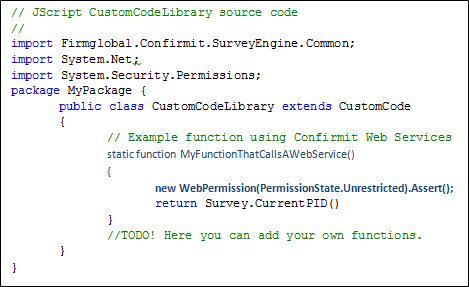
Figure 2 - The Jscript .NET syntax for the custom code class (CustomCodeLibrary.js) accessing Forsta Web Services
If your custom code needs access to other resources that are protected by a permission, then you will need to Assert them also, for example if you want to write or read a file. If you want your custom code to have unrestricted access to all resources then you can use the permission shown in the figure below.
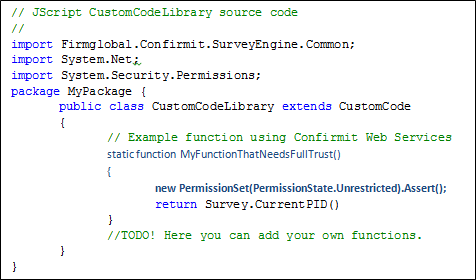
Figure 3 - The Jscript .NET syntax for the custom code class (CustomCodeLibrary.js) with unrestricted access
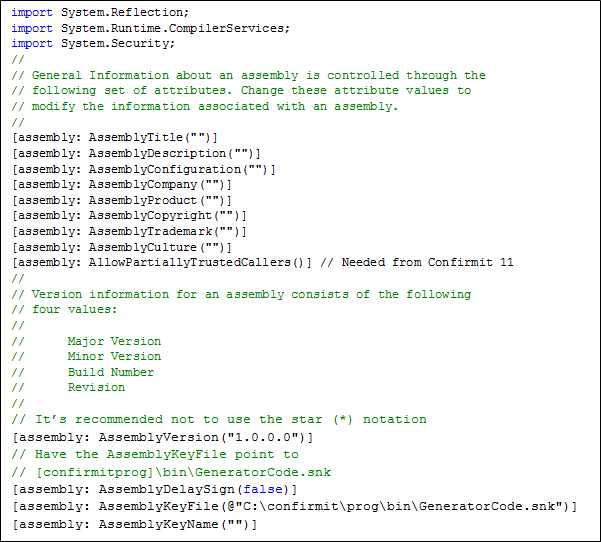
Figure 4 - The Jscript .NET syntax of the AssemblyInfo.js file