The easiest way to create a Custom Code Library in C# is to use Visual Studio .NET. From Visual Studio .NET do the following:
- Go to the File > New > Project menu command.
- Select project type Visual C# Projects, and template Class Library.
- Give the new project a logical name, such as CustomCodeLibrary.
- Rename Class1.cs to an appropriate name (in this example it is called CustomCodeLibrary.cs).
- Select the project from Solution explorer, and right click Add reference....
- Browse to the file
Firmglobal.Confirmit.SurveyEngine.Common.dll located at[CONFIRMITPROG]\web\wix\bin\ - Replace the content of CustomCodeLibrary.cs (Class1.cs) and AssemblyInfo.cs with the contents of Figure 1 and Figure 4 respectively.
- Build the solution (press Ctrl+Shift+B).
Visual Studio will now create a project with two source files, AssemblyInfo.cs and Class1.cs.
Note that the namespace name, class name and file name for the CustomCodeLibrary.cs file can be chosen arbitrarily.
Note the following:
- The methods you wish to expose through your Custom Code Library must be declared static and public.
- The standard Forsta Plus script functions can be accessed with the Survey prefix and using the dot notation. For example, the f(..) function can be accessed from the Custom Code Library with Survey.f(..).
- You must compile your assembly with an AssemblyInfo.cs file. This file should have a fixed version number (for example 1.0.0.0). Do not use the star (*) notation as this will cause the assembly to be incompatible when upgrading Confirmit. The version information is located in the AssemblyVersion tag in the AssemblyInfo.cs file (see Figure 4 ).
- You must have your assembly signed with a key distributed by the
Confirmit installation . This key is located at [confirmprogram]\bin\ GeneratorCode.snk. The location of the key file is specified in the AssemblyKeyFile tag in the AssemblyInfo.cs file (see Figure 4). - Custom Code Libraries intended for use in Data Processing or Reportal do not need to reference
Firmglobal.Confirmit.SurveyEngine.Common. or extend the Custom Code class.
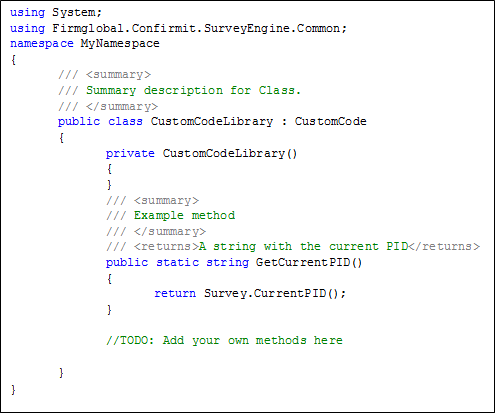
Figure 1 - The C# syntax for the custom code class
If your custom code library needs access to a web service then we need to assert that permission with an attribute on the custom code class as shown in Figure 2 below.
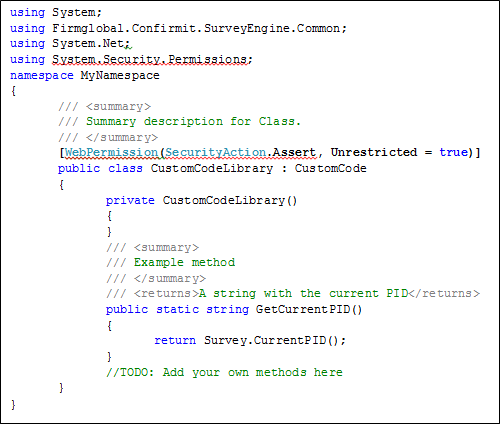
Figure 2 - The C# syntax for the custom code class accessing Web Services
If your custom code needs access to other resources that are protected by a permission, then you will need to assert them also. The class definition can have a list of permissions, however you are recommended to assert only the permissions you need. Note that asserting permissions is a required procedure.
If you want your custom code to have unrestricted access to all resources then you can use the permission shown in Figure 3 below.
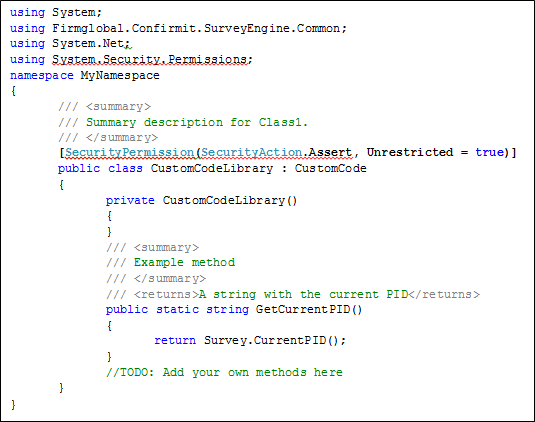
Figure 3 - The C# syntax for the custom code class accessing Web Services
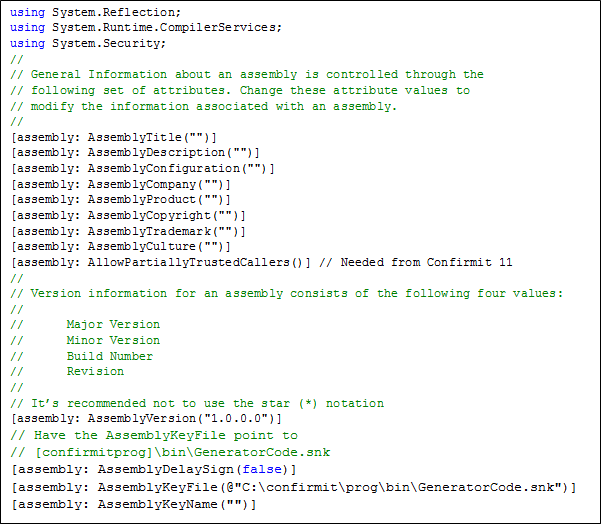
Figure 4 - The C# syntax of the AssemblyInfo.cs file